
BIOS RESET
(0
reviews)
Inhouse product
Price
Ksh1,499.00
Ksh1,500.00
/1
Share
Top Selling Products
-
 Ksh1,400.00
Ksh1,500.00 -
Ksh5,000.00
-
Ksh150.00
Ksh300.00 -
Ksh4,000.00
Ksh4,340.00 -
Ksh25,000.00
Ksh28,000.00 -
Ksh100.00
Ksh150.00


Reviews & Ratings
0
out of 5.0
(0
reviews)
There have been no reviews for this product yet.

A BIOS reset, also known as a CMOS reset or NVRAM reset, restores the BIOS settings to their factory default values. This can be helpful when troubleshooting hardware compatibility issues, forgotten BIOS passwords, or to revert the system to a known stable state.
Here's a more detailed explanation:
What it does:
- Restores to default settings: It clears the BIOS's configuration and resets it to the factory defaults, essentially erasing any custom settings you've made.
- Solves hardware issues: A BIOS reset can resolve issues caused by incorrect or conflicting hardware settings.
- Removes BIOS passwords: If you've forgotten your BIOS password, a reset can remove it.
Why you might need to do it:
- If you're experiencing conflicts or errors related to your hardware, resetting the BIOS can help.Forgotten BIOS password:
- A BIOS reset can remove the password, allowing you to access the BIOS again.
System instability: - If your system is unstable or experiencing unexpected behavior, resetting the BIOS can help.
Reverting changes: - You can use a BIOS reset to revert your system to a previous state if you've made changes that have caused problems.
How to perform a BIOS reset:
- Some BIOS setups allow you to reset to default settings from within the BIOS interface.
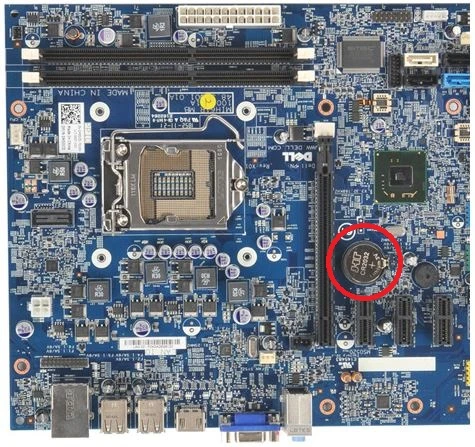
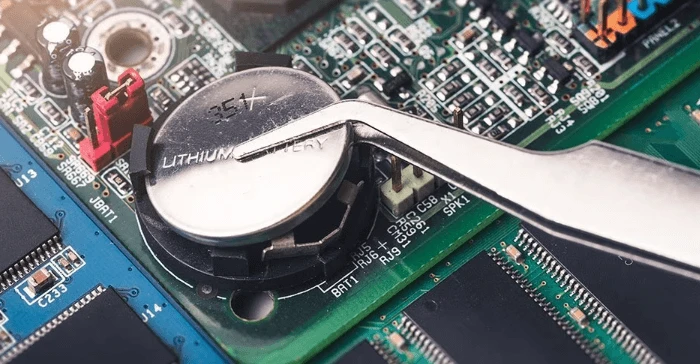
External reset (Hardware): - This involves physically clearing the CMOS battery or using a jumper on the motherboard.
Important considerations:
- Before resetting the BIOS, ensure you have a backup of any important data, as this process can reset boot order settings.
Consult your motherboard manual: - Your motherboard manual will provide specific instructions on how to access and reset the BIOS.
Proceed with caution: - Be careful when making changes in the BIOS, as incorrect settings can cause boot issues.
Frequently Bought Products
Top Selling Products
-
Ksh1,400.00
Ksh1,500.00 -
Ksh5,000.00
-
Ksh150.00
Ksh300.00 -
Ksh4,000.00
Ksh4,340.00 -
Ksh25,000.00
Ksh28,000.00 -
Ksh100.00
Ksh150.00
Footer Title
Description of Footer